

“To improve is to change; to be perfect is to change often.” — Winston Churchill
That idea now shapes the race to build faster AI data centers. A single NVIDIA GB200 NVL72 rack can draw 120 kilowatts. NVIDIA’s coming GB300 platform may push beyond 200 kilowatts per rack. At that scale, traditional air systems face serious limits.
Heat is no longer a side issue. It can affect speed, power costs, reliability, and the useful life of your facility. Liquid cooling moves heat about 3,000 times more effectively than air alone in high-performance computing environments.
In this guide, you will compare direct-to-chip cooling, immersion cooling, and retrofit-friendly designs. You will also see why Microsoft plans to use direct-to-chip systems in every new AI hall. The right choice can support greater compute density while strengthening your long-term infrastructure strategy.
Key Takeaways
- NVIDIA racks are pushing air-based designs toward their limits.
- Thermal planning now affects performance and operating costs.
- Direct-to-chip systems support higher compute density.
- Immersion cooling may suit specialized high-load facilities.
- Retrofit and purpose-built options serve different goals.
AI data centers liquid cooling direct-to-chip cooling immersion cooling data cen: Why It Matters Now
Modern computing is changing the thermal demands placed on every data center. As processors become more powerful, each rack produces more heat in a smaller footprint. That shift makes smarter infrastructure essential for reliable workloads.
Rising GPU Density and Rack Power
Traditional facilities often support about 12 kilowatts per rack. Ultra-high-density systems now reach roughly 85 kilowatts per cabinet, while an NVIDIA GB200 NVL72 rack can draw 120 kilowatts. Future designs may reach 200 to 250 kilowatts.
These levels challenge room-level airflow. A liquid loop can move heat away from each chip more directly than air. Immersion systems offer another path for specialized centers with extreme density and steady workloads.
Why Cooling Efficiency Affects AI Performance
Most facilities operate between 21 and 24 degrees Celsius. Stable temperatures help protect chip reliability, preserve clock speed, and reduce throttling during demanding workloads.
Cooling may consume 25% to 40% of facility power. Better efficiency therefore lowers operating costs while supporting consistent performance. For your data centers, thermal planning is now a core part of computing strategy.
Why Traditional Air Cooling Is Reaching Its Limits
Rack power is rising faster than many facilities can handle. Conventional air cooling usually dissipates about 15–30 kilowatts per rack. An eight-GPU NVIDIA HGX H100 server can exceed 10 kilowatts before storage, networking, and power hardware are added.
To manage that load, operators may install larger heatsinks, stronger fans, and wider airflow paths. These systems need more floor space and create more noise. They also send hotter exhaust air into nearby equipment, which can raise local temperatures and increase strain on building systems.
Air temperature can vary across one cabinet. Processors near the exhaust path may face warmer conditions than nearby components. That gradient can reduce stability and limit sustained performance.
Key pressure points include:
- Air cooling works best at moderate rack loads.
- High-power server systems require more fans and space.
- Hot exhaust air can affect neighboring equipment.
- Liquid moves heat about 1,000 times more efficiently by volume than air.
For modern server systems, cooling is now a capacity limit—not a minor facility detail.
The Main Liquid Cooling Options for Data Centers
Your best choice depends on rack density, building limits, and future expansion. Some systems fit an existing room, while others suit a new facility. Each option manages coolant in a different way.
“The right thermal design protects both performance and long-term value.”
Rear-Door Heat Exchangers for Retrofitting
A passive rear-door heat exchanger supports about 5–25 kilowatts per rack. An active model can handle up to 50 kilowatts and has tested above 70 kilowatts. This approach suits a retrofit because it captures exhaust heat without rebuilding the entire air system.
Direct-to-Chip Cooling for High-Density Racks
Direct-to-chip cooling attaches cold plates to CPUs and GPUs. A coolant distribution unit sends water or another coolant through each cold plate. This design removes heat at its source and supports dense racks with a smaller footprint.
Immersion Cooling for Maximum Heat Removal
Immersion cooling places complete servers in nonconductive dielectric fluid. The fluid surrounds processors, memory, and other parts for even temperature control. It works well in new facilities that need maximum density, though service practices and fluid handling require careful planning.
How Direct-to-Chip Cooling Works
Heat leaves a processor through a planned path. In a typical system, it moves through a thermal interface material, a cold plate, coolant tubing, and a facility heat exchanger. This direct liquid cooling method keeps high-power parts stable inside a dense data center.
Cold Plates, Thermal Interface Materials, and Coolant Loops
Cold plates sit above CPUs and GPUs. A thin thermal interface material fills tiny gaps between the plate and the chip. Water captures more heat than dielectric fluid. Glycol blends capture less heat, but their higher viscosity can support smoother pumping and flow control.
- Use clean coolant and strong filtration.
- Match fluid chemistry with plates, seals, and tubing.
- Control pressure to protect every connection.
- Choose plate channels that support even heat removal.
Single-Phase and Two-Phase Cooling Systems
Single-phase systems circulate coolant without changing its state. Two-phase designs boil a low-pressure dielectric fluid. The vapor carries heat away, then condenses for reuse. Both methods support reliable chip cooling, but each needs careful monitoring, maintenance, and leak protection.
Why Direct Liquid Cooling Is Becoming the Preferred AI Solution
High-performance computing now needs a thermal plan that can grow with each new server generation. Direct liquid cooling can support rack loads from about 60 to 250 kilowatts while remaining more retrofit-friendly than full immersion systems.
Microsoft has publicly committed to using direct-to-chip cooling in 100% of its new AI halls. This approach removes heat near the source, lowers fan demand, and helps processors maintain steady speeds. The result can improve performance per watt and reduce strain on facility systems.
Google’s Iowa and Ohio campuses use facility-water loops designed for future high-density workloads. That planning gives operators room to expand without replacing the entire thermal design.
Open Compute Project fittings also support plumbing interoperability. Racks from different vendors can share compatible connections, which may simplify upgrades and service work.
For your data center, direct liquid cooling offers a practical path toward higher density, better efficiency, and more predictable operating costs.
Immersion Cooling and the Future of High-Density Computing
Server rooms are entering an era where the tank, not the fan, may shape facility design. Immersion systems surround hardware with dielectric fluid, helping remove heat from dense racks with less airflow.
Single-Phase Versus Two-Phase Immersion
Single-phase immersion circulates fluid through a heat exchanger. It can reduce fan use, keep hardware cleaner, and support smaller buildings. ByteDance has standardized this approach across new Asian facilities.
Two-phase immersion boils dielectric fluid near 50 degrees Celsius. Vapor rises to a coil, condenses, and returns to the tank. This method can offer strong chip cooling, but it adds control points and service needs.
Meta has confirmed immersion pods at its Richland Parish, Louisiana campus. Vendors such as Submer, GRC, LiquidStack, Iceotope, and Asperitas now serve this growing market. Their systems may also support heat reuse and better energy efficiency.
Before choosing a design, review fluid chemistry, environmental impact, maintenance procedures, and single-point-of-failure risks. A well-planned system protects equipment while supporting reliable chip cooling.
| Approach | Main strength | Primary concern |
|---|---|---|
| Single-phase | Simple circulation and lower fan use | Fluid handling and service training |
| Two-phase | Strong heat transfer near 50°C | Vapor control and fluid management |
| Immersion pods | Compact facility design | Shared equipment risk |
Cooling Infrastructure You Need for AI Workloads
A reliable thermal system connects each rack to the building’s wider utility network. Your choice of equipment affects capacity, service access, operating cost, and future growth.
Coolant Distribution Units and Heat Exchangers
A liquid-to-liquid CDU separates treated water or water-glycol from the facility’s main chilled-water loop. This barrier protects sensitive rack hardware and makes fluid control easier. Pipes and pumps link the CDU to each rack loop.
A liquid-to-air CDU uses fans and coils to release heat into existing room systems. It can simplify a retrofit, but its capacity is lower. A liquid-to-refrigerant CDU uses direct-expansion refrigerant condensers, making it useful where onsite chilled water is unavailable.
Facility Water, Air, and Refrigerant Loops
Before installation, check water quality, flow rate, pressure, and heat rejection capacity. Continuous operation also requires backup pumps and clear alarm settings.
Manifolds, Pumps, and Fluid Management
Manifolds divide flow across high-density racks. Quick disconnects and shutoff valves support safer service. Filtration removes particles, while sensors confirm stable flow and temperature. Good fluid management protects chip cooling performance and reduces service risk.
The Efficiency, Cost, and Sustainability Benefits of Liquid Cooling
Thermal design now plays a major role in your facility budget. Datacenter Dynamics reports that cooling may account for up to 40% of a data center’s total energy bill. Lowering that burden can improve operating efficiency and protect long-term margins.
“The cheapest kilowatt is the one your facility never needs to use.”
ASHRAE reports that combining liquid and traditional systems can reduce total cost of ownership. Modern sites may reach a PUE of 1.05–1.10, compared with about 1.5 in legacy halls. That gap shows how thermal upgrades can support stronger performance with less wasted power.
Closed-loop designs can also limit resource use. Facilities in Arizona and Nevada reported WUE below 0.1 liters per kilowatt-hour in 2025. Less makeup supply can ease pressure in regions with tight utility limits.
Key benefits include:
- Lower power demand for heat removal
- More stable chip temperatures
- Reduced utility exposure
- Better support for sustainable growth
The U.S. Department of Energy reinforced this direction with a $40 million 2023 program for advanced facility cooling technologies.
How to Prepare Your Data Center for Liquid Cooling
Good planning turns a complex upgrade into a measured facility project. Start by estimating your next one to two years of AI capacity. You can then convert racks in stages or reserve one room for high-load systems.
Measuring Thermal Footprint and Flow Requirements
Review each server configuration, airflow pattern, equipment refresh, and existing cooling limit. Record heat output by rack, room, and workload. Future chip generations may need higher flow rates and larger distribution units than current systems.
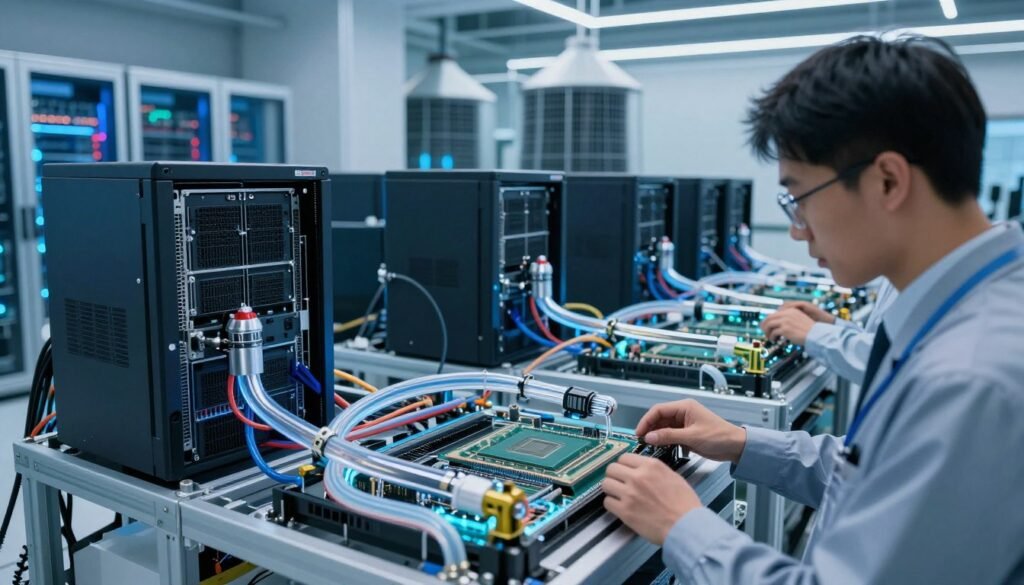
Build a clear record of pressure, temperature, energy use, and available water capacity. This data supports sound design choices and helps protect efficiency during growth.
Managing Leak Detection, Compatibility, and Maintenance
Use pressure and flow monitoring for early warning. Direct sensors and detection cables can identify moisture near fittings. Compatible fluid, seals, filters, and connectors also reduce service risk.
- Install quick disconnects and shutoff valves.
- Test alarms during planned maintenance.
- Inspect fittings, filters, and fluid quality.
| Planning area | Recommended action | Result |
|---|---|---|
| Capacity | Forecast two years | Phased expansion |
| Monitoring | Track flow and pressure | Faster response |
| Service | Use valves and disconnects | Safer maintenance |
Conclusion
Power growth has changed the rules for modern AI facilities. Systems such as NVIDIA’s GB200 NVL72 can reach 120 kilowatts per rack, far beyond the older 12-kilowatt norm. Air remains useful for lighter servers, but liquid cooling now supports many new high-density deployments.
For most projects, direct-to-chip design offers the best balance of rack density, retrofit ease, vendor choice, and service control. Immersion remains a strong option for new campuses, hot regions, sovereign AI programs, and extreme workloads.
Your cooling roadmap should cover heat load, flow, facility loops, leak alerts, water use, energy goals, and future hardware. The strongest AI facilities treat thermal support as core computing infrastructure, not an afterthought.